Every position
on one radar
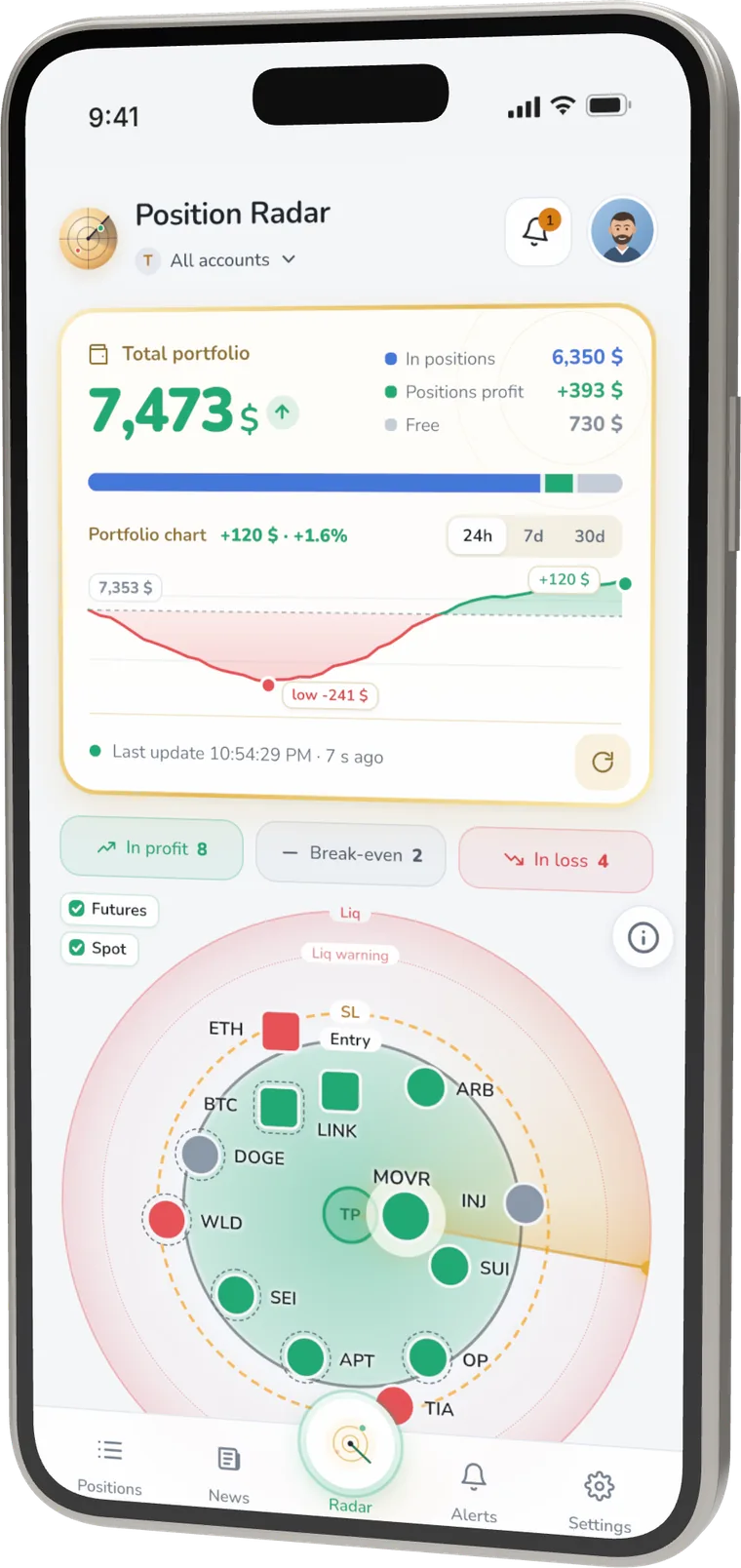
Futures and spot positions from all your exchanges and sub-accounts on a single screen. See what is in profit, near break-even or close to liquidation at a glance.
All exchanges,
one picture
The radar places every position by how it is doing. The centre is your next take-profit, the rings are entry, stop-loss and liquidation.
- Futures and spot from every connected account
- Total balance, daily change and history
- In profit, break-even and in loss at a glance
TP, SL and liq
at a glance
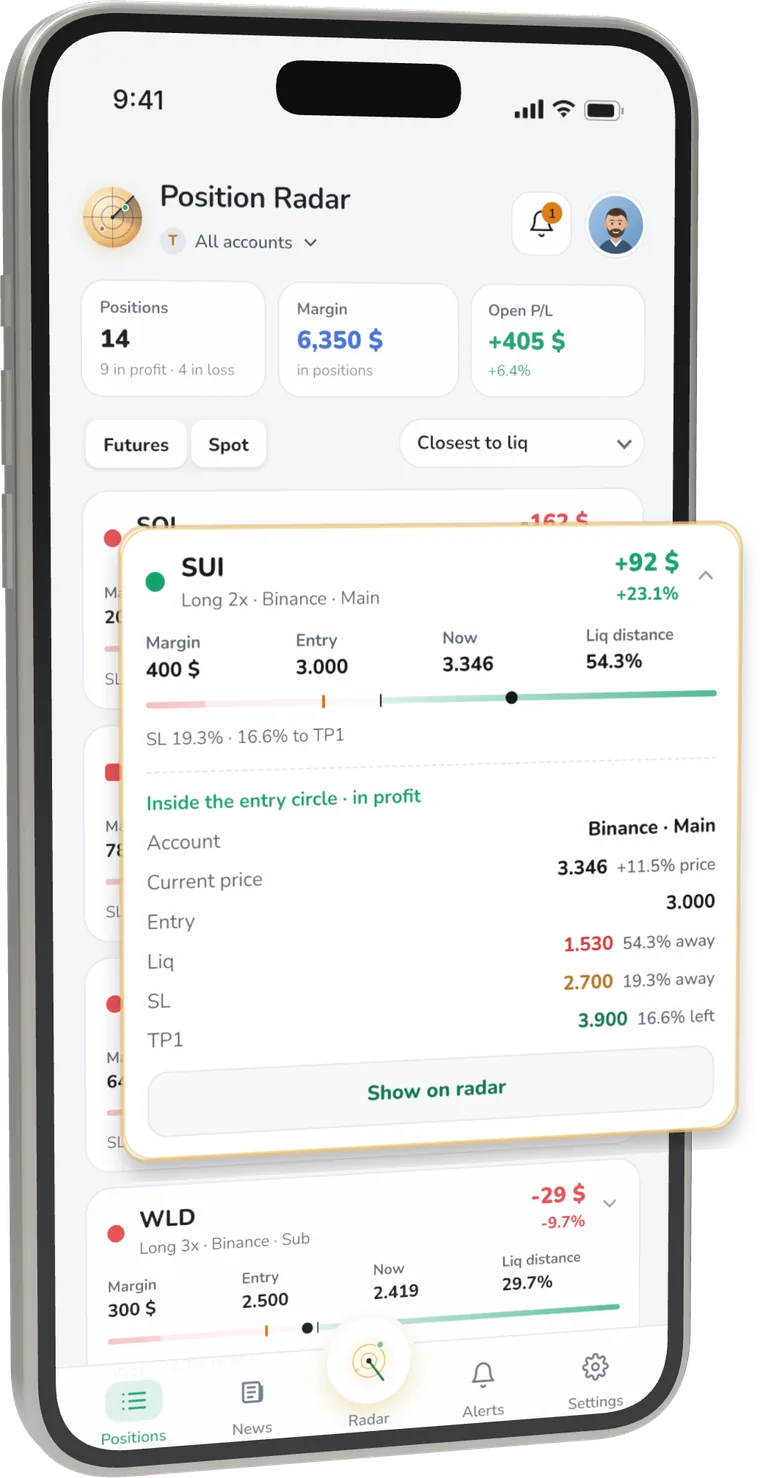
Every position shows how far it is from take-profit, stop-loss and liquidation, with margin, entry and current price.
- Sort by distance to liquidation, PnL or exchange
- Open time and the exchange account of each position
- Shake your phone to refresh
Alerts that
matter
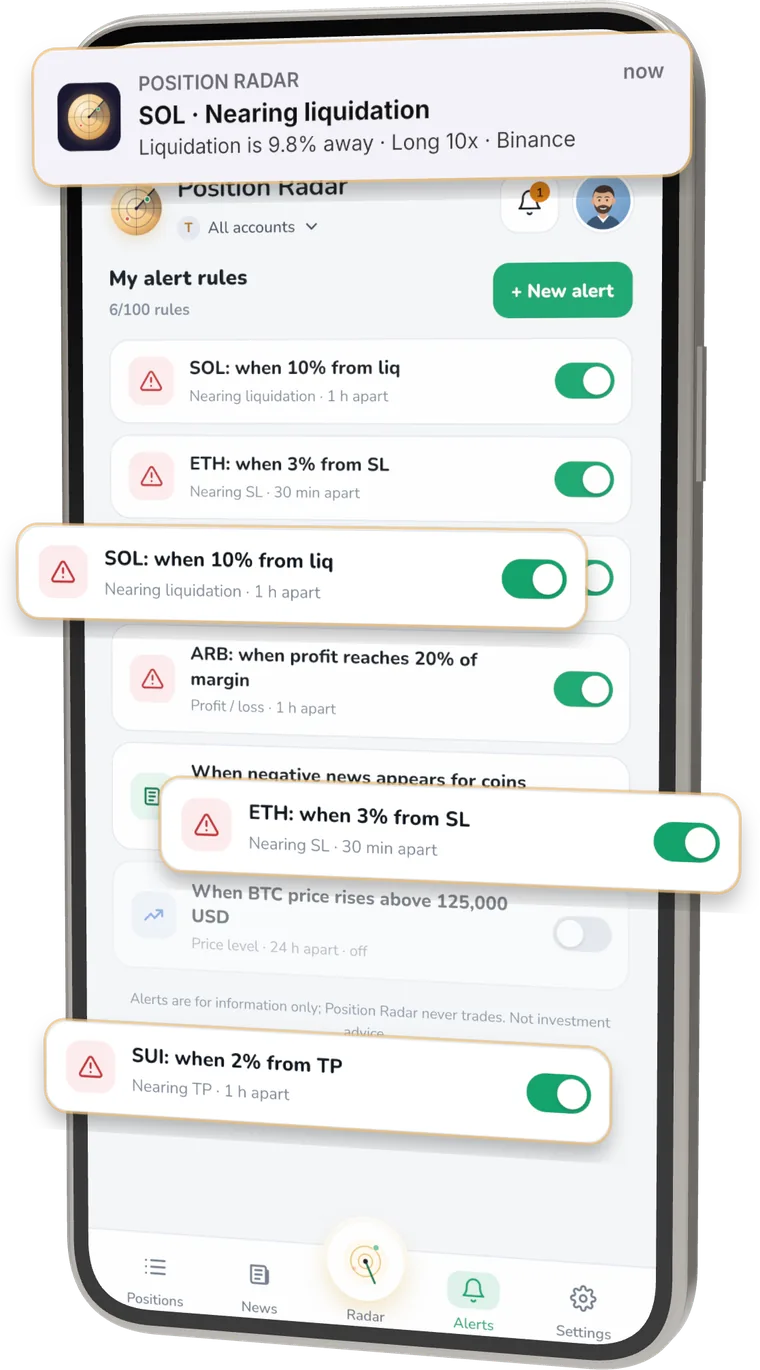
Get a notification when a position nears liquidation, stop-loss or take-profit, when PnL or your balance moves, or when negative news hits your coins.
- Choose how often each alert can repeat
- Quiet hours, with liquidation alerts still allowed
- Economic calendar and Fed decisions
News and
market mood
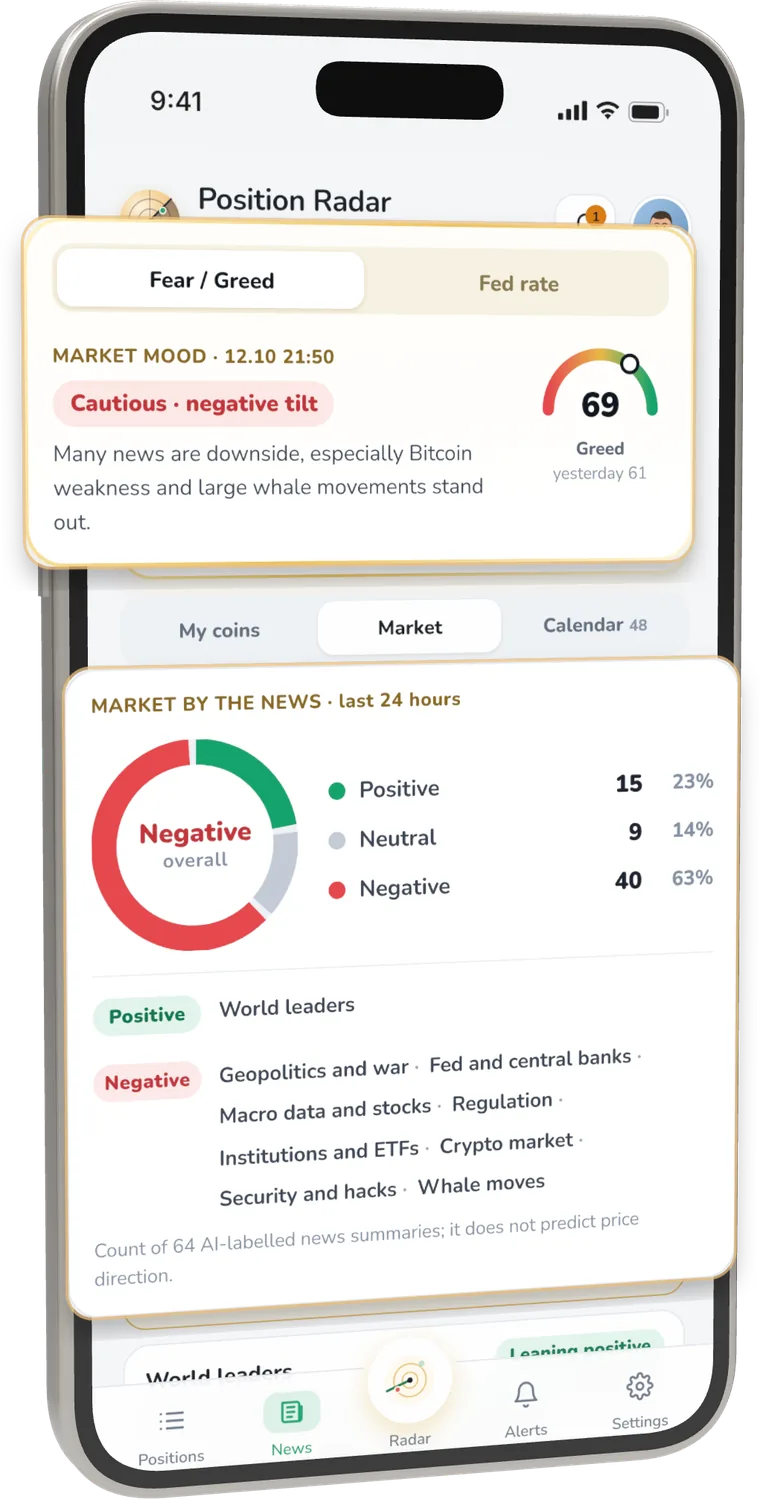
Short summaries of today's headlines with links to the original sources, the Fear & Greed index, the Fed rate and the economic calendar.
- News for the coins you hold
- Positive, neutral and negative share of the day's news
- Calendar events with time and expected impact
Read-only
by design
Position Radar only reads. It cannot place orders, trade or withdraw.
Keys with trading or withdrawal permissions are rejected when you connect.
Your keys are stored encrypted on our server and are never shown again.
Delete your account and all data, including keys, from inside the app.
Start free,
upgrade when ready
After signing in, every feature is open for 7 days. Then choose a plan or keep using the free version.
Free
- 1 exchange
- 3 positions on the radar
- 3 alerts
- Today's news and calendar
- Dark theme
Monthly
- Up to 10 exchanges, sub-accounts included
- All positions
- 100 alerts
- Full calendar, 7 days of coin news
- Dark and automatic theme
Yearly
- Up to 10 exchanges, sub-accounts included
- All positions
- 100 alerts
- Full calendar, 7 days of coin news
- Dark and automatic theme
Lifetime
- Everything in Premium, forever
- VIP support, reply within 24 hours
Payments are made through your Apple ID. Subscriptions renew automatically unless cancelled at least 24 hours before the end of the period. Prices may vary by country.
Frequently asked questions
About Position Radar
What is Position Radar?
Position Radar is an iPhone app that shows every futures and spot position across all your crypto exchanges and sub-accounts on one screen, on a single radar. You see at a glance which positions are in profit, near break-even or close to liquidation. It works with read-only access, so it cannot trade or withdraw.
How can I track crypto positions from several exchanges in one place?
Create a read-only API key on each exchange and connect it to Position Radar. The app reads positions, balances and open TP/SL orders from every connected account and shows them on one radar with your total balance and daily change.
Which exchanges are supported?
Binance, plus Bybit, OKX, Bitget, KuCoin, Gate and MEXC in beta. Sub-accounts are supported. If something looks wrong on a beta exchange, write to destek@elamoon.com.
What does the radar show?
The radar places every position by how it is doing: the centre is your next take-profit (TP), and the rings are entry price, stop-loss (SL) and liquidation. You see at a glance which positions are near their target and which are near liquidation.
Is there an Android version?
Position Radar is launching on iPhone first. An Android version is coming soon.
Who makes Position Radar?
Position Radar is developed by independent developer Saim Gürses under the ElaMoon brand. Write to destek@elamoon.com; we usually reply within 1–2 business days.
Security and API keys
Can Position Radar trade or withdraw my funds?
No. It works only with read-only API keys. On Binance, Bybit, OKX, Bitget and KuCoin the key permissions are checked when you connect, and keys with trading, withdrawal or transfer permissions are rejected.
What is a read-only API key and how do I create one?
It is a key that lets an app see your exchange data but not trade or withdraw. On your exchange's API management page create a new key, tick only the Read permission, leave Trade, Withdraw and Transfer off, and add an IP restriction if you can. Then enter the key and secret in the app under Settings › Connect exchange. OKX, Bitget and KuCoin also ask for the API passphrase.
Why can't permissions be checked on Gate and MEXC?
Gate and MEXC do not expose key permissions, so the app cannot check them there. When you connect, you are asked to confirm that the key is read-only; please create it with read permission only.
Are my API keys safe?
Keys are stored encrypted on our server and are never shown again in the app. With a read-only key nobody can trade or withdraw from your account. Adding an IP restriction on your exchange makes it safer, and you can remove the connection and delete the key on your exchange at any time.
What data is stored?
Your sign-in details (email, name), your encrypted API keys, your total portfolio value every 5 minutes for the chart (31 days), when positions were first seen and their coin names, your alert rules and triggered alerts (30 days) and your membership details. Your data is not sold, and the app has no ads or tracking. See the privacy policy for details.
How do I delete my account and data?
In the app: Profile › My account details › Delete my account. Your account and all your data, including API keys, are deleted permanently.
Alerts and market
When do I get alerts?
You can be notified when a position nears liquidation, stop-loss or take-profit, when your PnL or balance moves, and when negative news hits coins you hold. Your rules are checked every minute; triggered alerts appear in the bell screen and arrive as notifications on your phone.
Can I control how often alerts repeat?
Yes. You can choose how often each alert can repeat and set quiet hours, while still allowing liquidation alerts during quiet hours.
What is on the news and market screen?
Short summaries of the day's headlines with links to the original sources, news for the coins you hold, the positive, neutral and negative share of the day's news, the Fear & Greed index, the Fed rate and an economic calendar with times and expected impact.
How do I see how close a position is to liquidation?
Every position shows how far it is from take-profit, stop-loss and liquidation, with margin, entry and current price. You can sort positions by distance to liquidation, PnL or exchange.
Pricing and account
Is Position Radar free?
After you sign in, every feature is open for 7 days, no card needed. Then you can keep using the free version: 1 exchange, 3 positions on the radar, 3 alerts, and today's news and calendar. Premium adds up to 10 exchanges (sub-accounts included), all positions, 100 alerts, the full calendar, 7 days of coin news and dark/automatic theme.
How much is Premium?
In the US it is $9.99 a month, $99.99 a year (2 months free compared to monthly) or $199.99 once for lifetime; in Türkiye ₺499.99, ₺4,999.99 and ₺9,999.99. Lifetime also includes VIP support with a reply within 24 hours. Prices may vary by country; the price shown in the App Store applies.
How do I cancel my subscription?
Payments are made through your Apple ID. Open the App Store app, tap your profile, then Subscriptions; you can also open it from the profile menu in Position Radar. Subscriptions renew automatically unless cancelled at least 24 hours before the end of the period.
Do I need an account?
You can try the demo without signing in. To see your own positions, sign in with Apple or Google and connect a read-only key.
What if my data looks wrong or incomplete?
Data is read directly from your exchange; if the exchange does not respond there may be a short delay. Pull down to refresh or shake your phone. If it continues, write to destek@elamoon.com with a screenshot.
Is Position Radar investment advice?
No. Position Radar only shows information about your positions and the market; it is not investment advice. The app is not designed for people under 18.
Your positions,
always in sight
Connect a read-only key and see every exchange on one radar in a minute.
Download on theApp Store